 PromptVault
AI prompt library for ChatGPT, Claude & Gemini
The blank box is
the hard part.
 CareerInterview rambling becomes one defensible STAR answer
 RelationshipsTurn an angry draft into a boundary that can be answered
 TravelDoes this itinerary work at door-to-door speed?
 CodingSplit a large change into a reviewable PR stack
 FinanceWhich consolidation route lowers the real burden?
 Study & ExamsWhy rereading feels stronger than it is
 MarketingCustomer interview questions that do not plant the answer
PromptVault is the ask, already worked out. Fill in the blanks, copy, paste.
iPhone, iOS 18 and later. Free covers the whole library.
You know roughly what you want,  so you type a rough version of it — then spend the next three messages fixing what you should have asked for in the first place.
One of 1,493
This is one
of them.
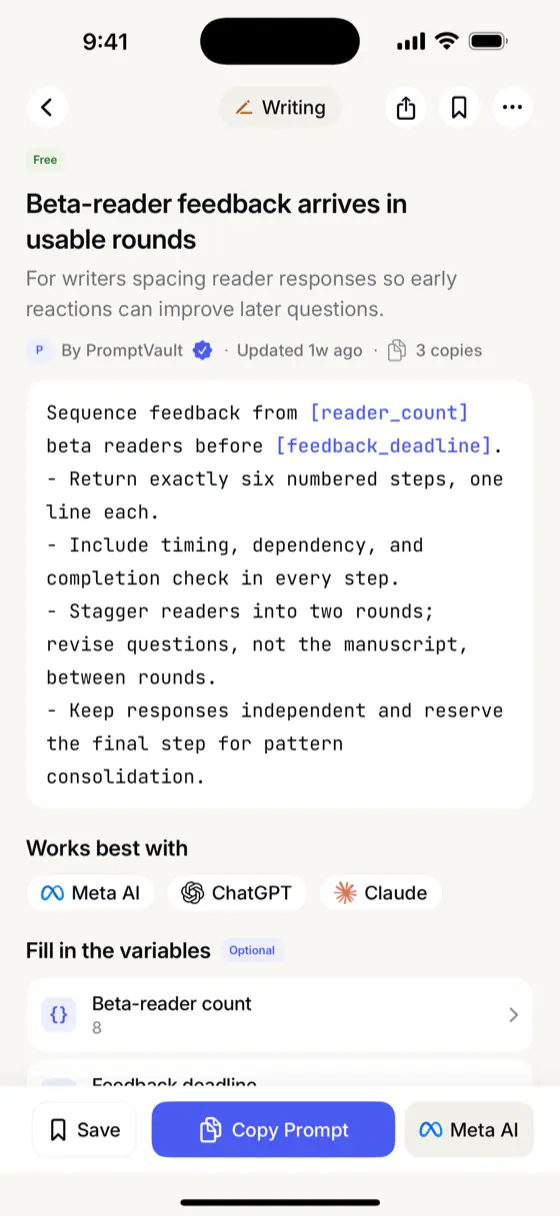
A writer with a finished draft and eight people willing to read it. The hard part is not what to ask them — it is how to stagger the rounds so the second batch of readers answers a better question than the first.
Writing
Beta-reader feedback arrives in usable rounds
The prompt already fixes the rounds, the dependencies and the stopping condition. Two blanks are left, because they are the only things it cannot know: beta-reader count and feedback deadline. Fill those in, tap Copy Prompt, paste.
The library
Written for a moment
you’ll recognise.
Eight titles, exactly as they appear in the app:
- CodingSplit a large change into a reviewable PR stack
- CareerInterview rambling becomes one defensible STAR answer
- RelationshipsTurn an angry draft into a boundary that can be answered
- FinanceWhich consolidation route lowers the real burden?
- TravelDoes this itinerary work at door-to-door speed?
- Study & ExamsWhy rereading feels stronger than it is
- MarketingCustomer interview questions that do not plant the answer
 CookingTrace a baking failure without changing everything at once
24 categories.
Not one called General.
1,493 prompts, all written and edited in-house — nothing scraped, nothing submitted by other users — and all of them ship inside the download, so browsing, search and copy work with no signal at all.
Pricing
Free is the
whole library.
Every prompt is readable, searchable and copyable without paying. Pro lifts the two limits and unlocks the prompts and expert packs marked Pro.
- Weekly$9.99 billed every weekbilled every week
- Monthly$19.99 billed every monthbilled every month
- Best valueYearly$49.99 billed every year7-day free trial
Free
- All 1,493 prompts, readable in full
- Offline search across the library
- Fill in the variables and copy
- 25 saved prompts
- 3 collections
Pro
- Unlimited saved prompts
- Unlimited collections
- Pro-only prompts unlocked
- Expert packs unlocked
Subscriptions are sold and billed by Apple. Prices shown are US App Store prices; your local price is confirmed by Apple before you buy. A subscription renews until you cancel it in Settings → your name → Subscriptions, and refunds are handled by Apple. Full detail is in the Terms of Use.
- Coding
- Marketing
 Business
 Sales
Sales- Career
 Productivity
- Finance
 Data & Research
- Writing
 Design
 Art & Image
 Video
Video Music
Music Social Media
 Education
 Language Learning
- Study & Exams
 Fitness
- Cooking
- Travel
 Health & Wellness
- Relationships
 Parenting
 Personal Growth
Four things people ask.
Does it really work offline?
Yes. The library is part of the app download, so browsing, searching, reading and copying need no connection. Signing in and syncing your saves do.
Where do the prompts come from?
We write and edit them in-house. Nothing is scraped from the web and there is no way for users to submit prompts, which is why the quality holds and why you will not find the same idea three times under three titles.
Do I need an account?
Yes — Sign in with Apple. Your saved prompts and collections belong to the account, which is what lets them survive a reinstall and turn up on a new device. Apple’s Hide My Email works fine.
How do I cancel?
In Settings → your name → Subscriptions. Apple owns the billing, so cancelling there is the only place it takes effect. More on the support page.
Have it before
you need it.
iPhone, iOS 18 and later. Free to start, and the whole library is readable before you decide anything.